

Students Information
Dear Students,

In light of and in accordance with the Ministry of Health's instructions starting Wednesday, March 18, 2020, entrance to the campus is prohibited.All of the second semester courses will be delivered online through the ZOOM system until further notice.
Following the growing concerns about security and privacy using ZOOM, here is a link to an information page about working with ZOOM in a secure manner.


Accessing ZOOM System
​

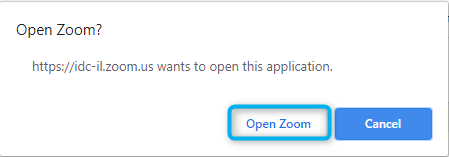
You need to go to the course site in Moodle and click on the link that the lecturer made sure to put in time. After clicking the link, you will be taken to the ZOOM website where you will be asked to click on the Open Zoom button:


If this is your first login, you will need to download and run the software by clicking "download & run zoom" at the bottom of the screen.


For those interested in attending classes using the smartphone, we recommend downloading from the app store and installing the ZOOM app in advance.


If the lesson has not yet begun, wait or repeat again at the start date.

Tips for Successful Online Teaching


  • Make sure the video of participants is off when entering the meeting (set by default)
  • Make sure the participants' microphone is muted during meeting (set by default)
  • Lesson materials - presentations / videos, etc. must be ready in advance on the computer with which the lesson is being delivered.
  • Avoid using wifi if you can (unless wifi is known to be stronger / better than cellular browsing)

  • Please log in before class to make sure everything is working properly (video, audio, etc.)
  • It is advisable to find a quiet place and avoid as much noise as possible during class
  • Virtual background is recommended
  • Make sure to post the lesson recording on the moodle course site
  • We recommend posting more materials from the class (such as whiteboard and chats) on the moodle course site